Option 1: with a code from the bot (simplest)
- Download and install the app.
- In @smartdoclabs_bot press «LITSENZIYA» and get a code.
- In the app press «Sotib olish / kalitim bor», enter the code and press «Faollashtirish». Done.

SmartDoc Alifbo · Smart DOC Labs
Convert documents to the new Uzbek Latin alphabet on your computer: .docx, .xlsx, .pptx and text files. The free converter on this site works up to 1000 words.
3 days free, up to 30 files
If the installer does not open, download the archiveQuotation marks show app buttons (the app is in Uzbek), bold shows site buttons.
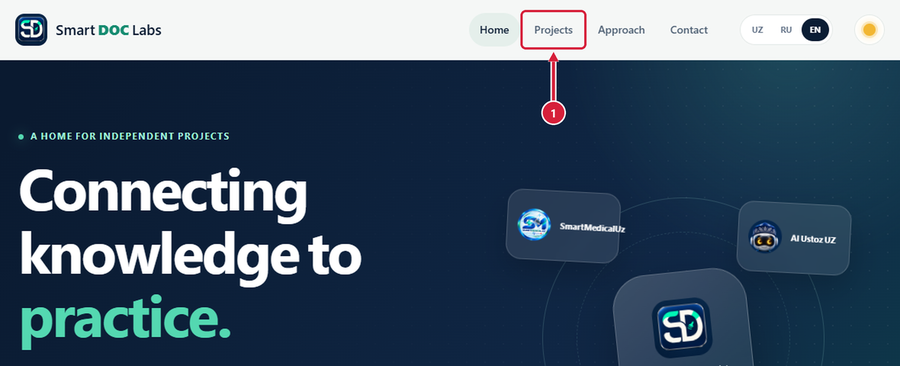
Open smartdoclabs.uz in your browser and go to the Projects section at the top.
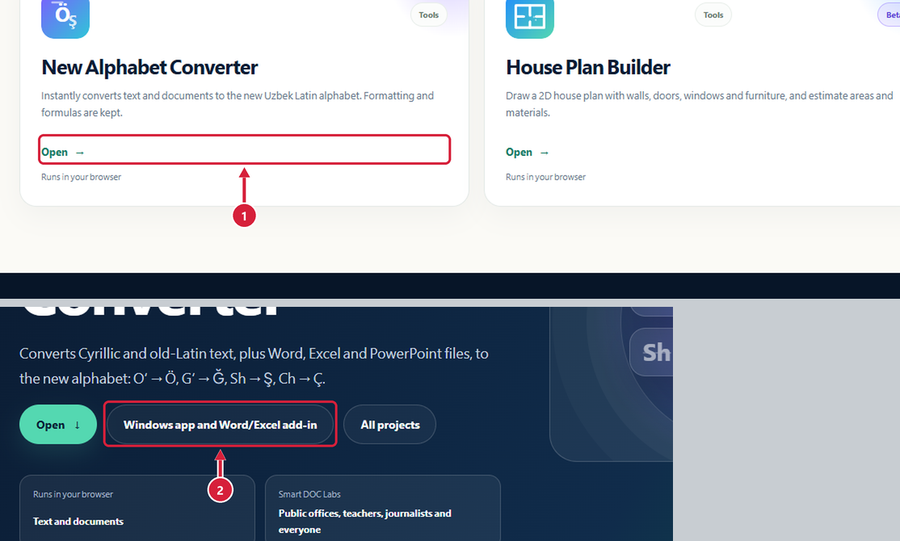
On the new alphabet converter card press Open, then the link to the Windows app and Word/Excel add-in. Short way: type smartdoclabs.uz/en/alifbo in the address bar.
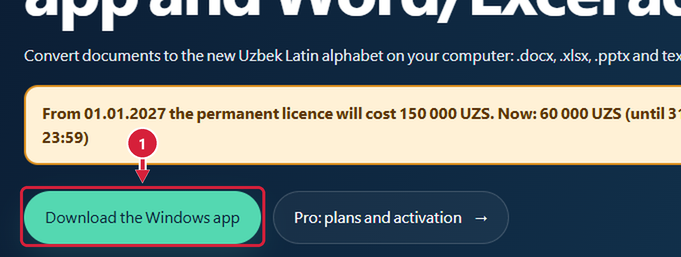
Press Download the Windows app: SmartDoc_Alifbo_Setup.exe downloads. If the browser warns that the file is rarely downloaded, choose to keep the file in the downloads list.
Double-click the downloaded file. A blue window may appear: «Windows protected your PC» (shown in Russian in the picture). This is normal: the app is new and has no digital signature yet, so Windows does not recognise it. Continue only if you got the file from smartdoclabs.uz: press More info.
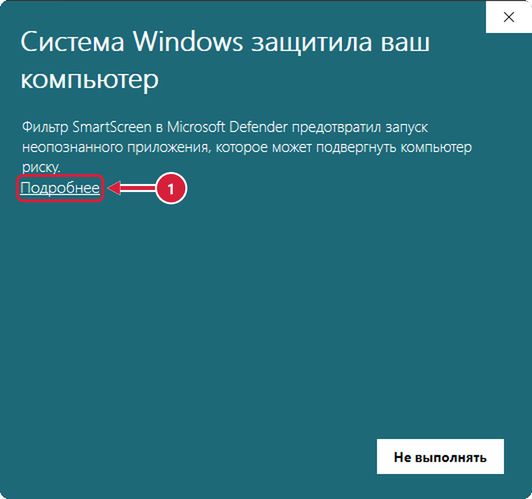
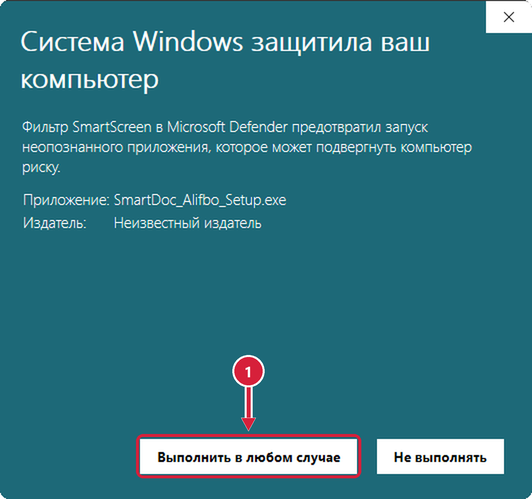
Then press Run anyway. You do not need to change Windows or antivirus settings.
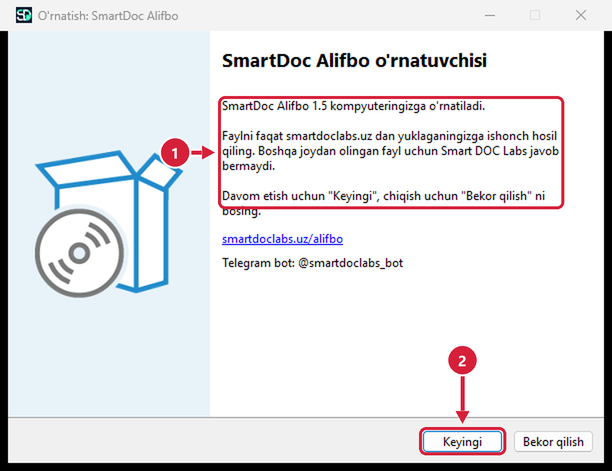
The installer opens. Read the warning and press «Keyingi» (Next).
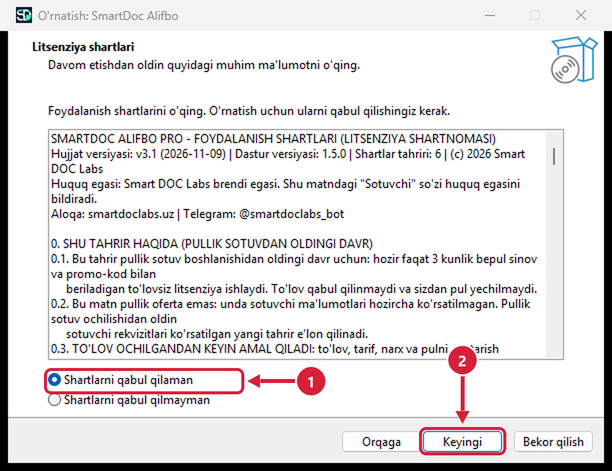
Read the terms, select «Shartlarni qabul qilaman» (I accept the terms) and press «Keyingi».
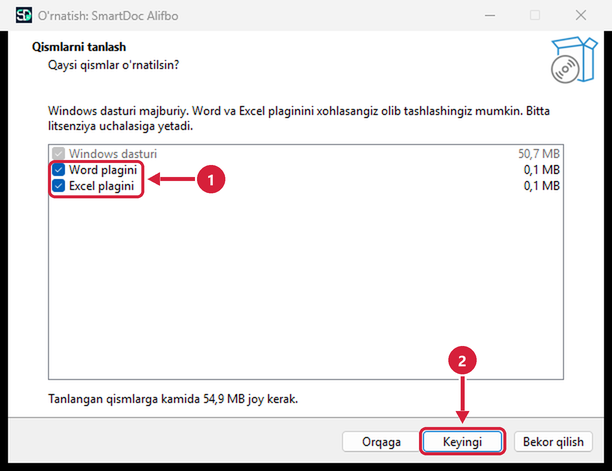
Choose the components. The Windows app is required, the Word and Excel add-ins can be removed. One licence covers all three. Press «Keyingi», then «O‘rnatish» (Install).
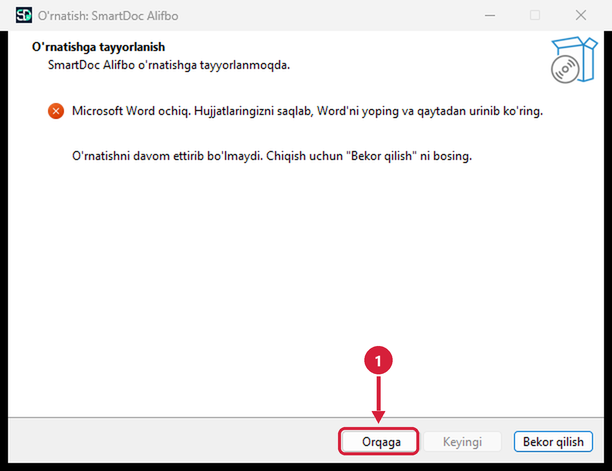
If you see «Microsoft Word ochiq» or «Microsoft Excel ochiq» (Word or Excel is open): save your document, close that program, press «Orqaga» (Back) and «O‘rnatish» again.
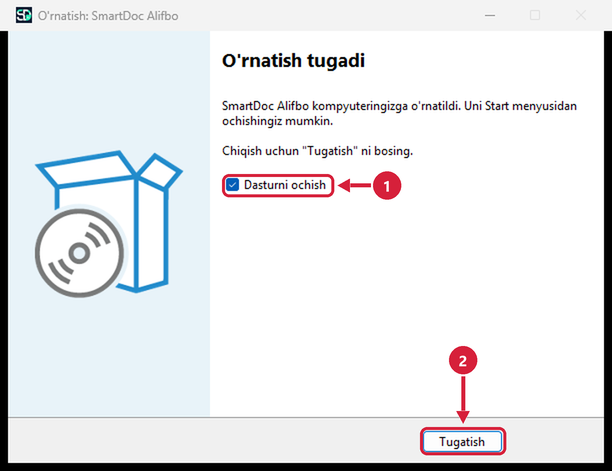
Keep «Dasturni ochish» (Open the app) selected and press «Tugatish» (Finish). Later the app opens from the Start menu.
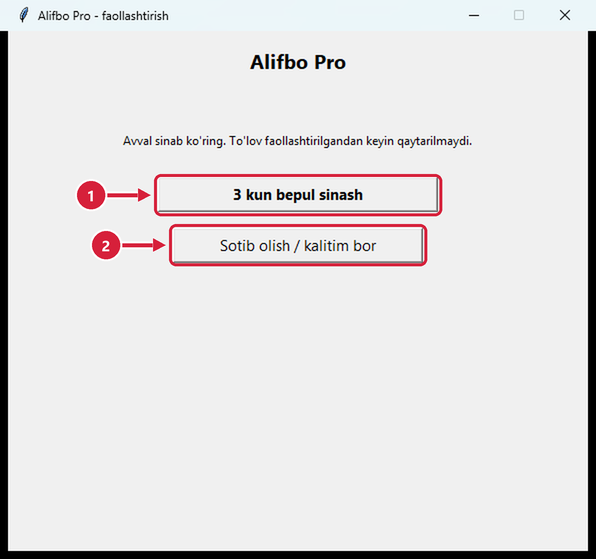
The first launch shows two buttons. To try it, press «3 kun bepul sinash» (3 days free): internet is needed once, up to 30 files in 3 days. If you have a promo code or key, press «Sotib olish / kalitim bor» (Buy / I have a key) and go to the next section.
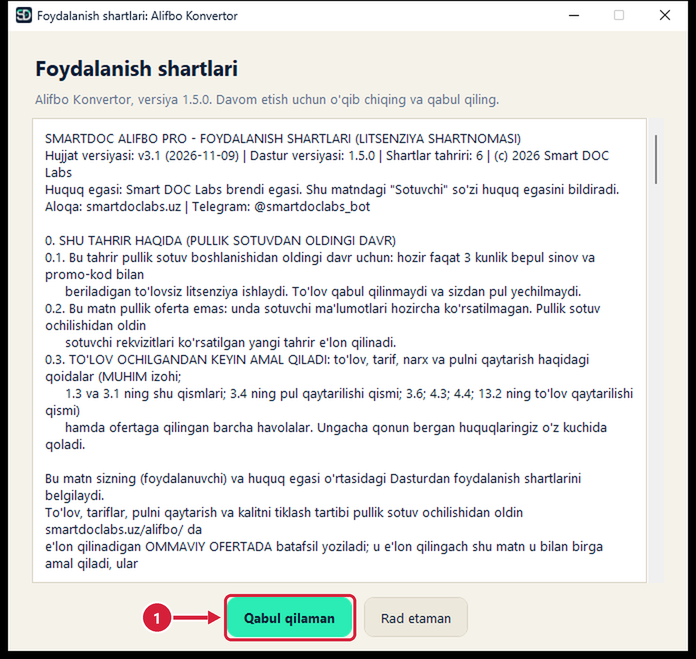
Read the terms of use and press «Qabul qilaman» (I accept).
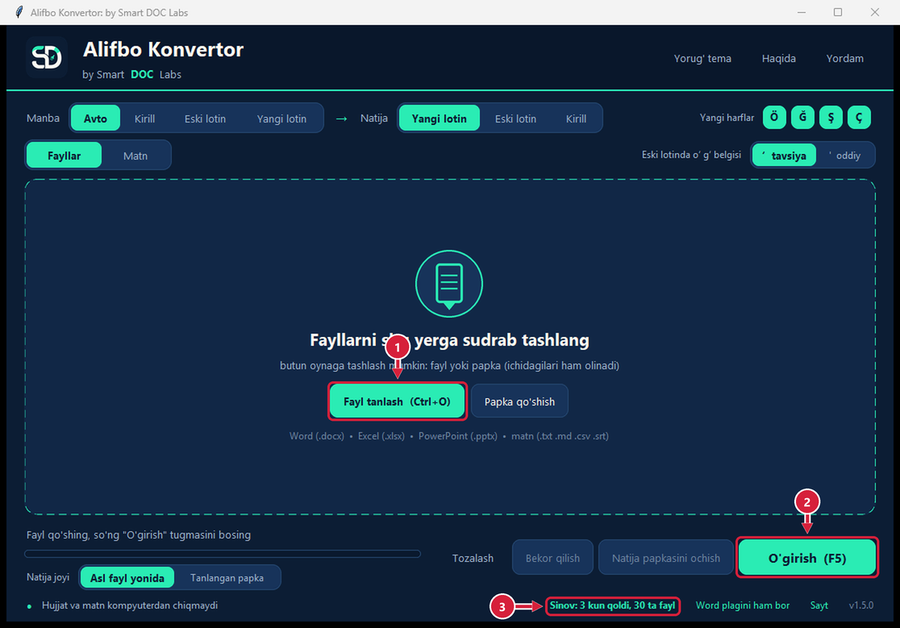
The app is ready. Drop a file on the window and press «O‘girish» (Convert). The remaining trial is shown at the bottom.
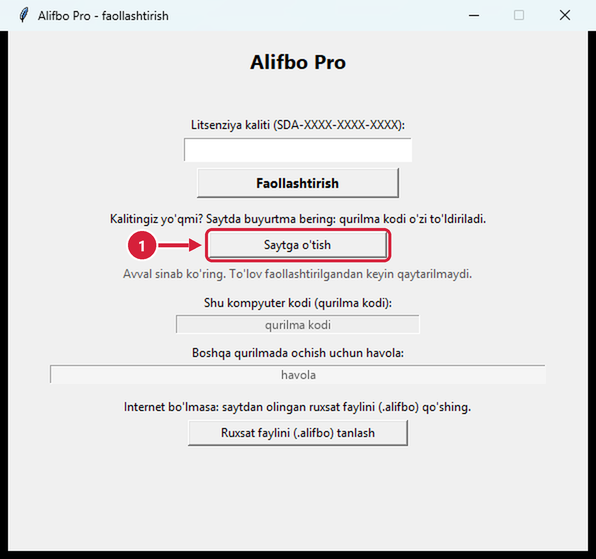
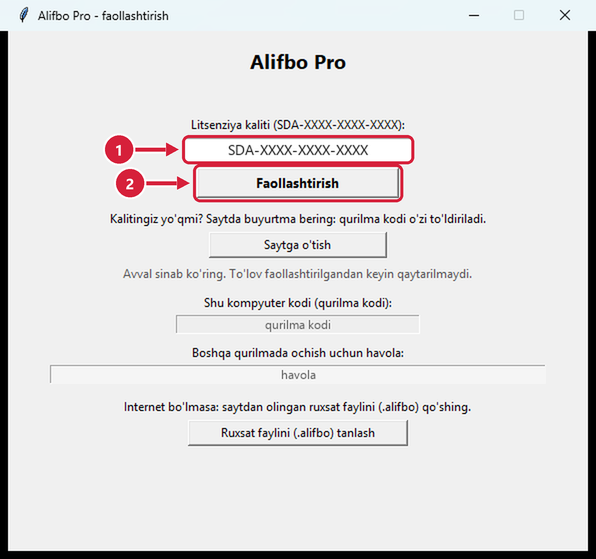
Option 1 (simplest): press «Sotib olish / kalitim bor», enter the code from the bot in the «Litsenziya kaliti yoki botdan olingan kod» (key or code from the bot) field and press «Faollashtirish» (Activate). Done: the key is shown in the window and saved on the computer. No need to visit the site.
Option 2 (key via the site): in the «Sotib olish / kalitim bor» window press «Saytga o‘tish» (Go to site). The site opens with your device code. If you already have a key, go to the step where you paste the key.
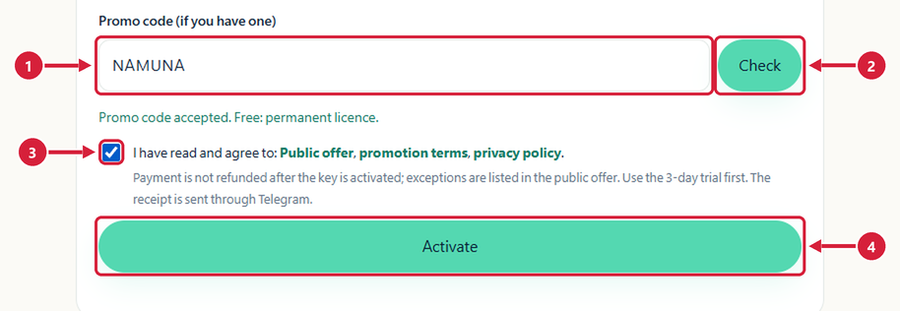
On the site enter the promo code, press Check, tick the consent box and press Activate.
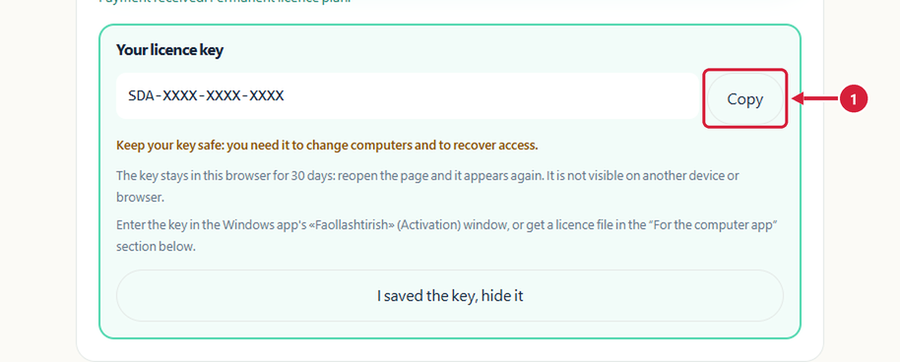
The key appears. Press Copy and keep the key: it is not sent to the bot or the chat.
Go back to the app, paste the key and press «Faollashtirish» (Activate). Done: the app and the add-in work.
Getting a code: in @smartdoclabs_bot press «LITSENZIYA». The bot tells you the price; if you agree, write «Ha» and we will contact you within 24 hours and send a code.
Open the app from the Start menu. At the top, «Manba» (Source) should be set to «Avto» (1) and «Natija» (Result) to «Yangi lotin» (2): the app detects Cyrillic and old Latin script by itself.
Drag a Word (.docx), Excel (.xlsx), PowerPoint (.pptx) or text file into the window or press «Fayl tanlash» (Choose file) (1), then press «O‘girish (F5)» (Convert) (2). With «Natija joyi» set to «Asl fayl yonida» (Next to the original) (3), the result is saved as a separate file next to the original, with _yangi_lotin added to its name. The original file is not changed.
In Word: open the «Alifbo» section at the top (1) and press «Hammasi → Yangi» (2): the whole document is converted to the new alphabet. If you don’t like the result, undo with Ctrl+Z.
In Excel: open the «Alifbo» section (1), choose «Avto → Yangi lotin» in the «Yo‘nalish» (Direction) list, then press «Belgilangan» (Selection), «Varaq» (Sheet) or «Kitob» (Workbook). «Kitob» converts the whole file. Formulas, numbers and dates are not touched; undo: Ctrl+Z.
Check the result: look over names, terms and abbreviations. A Russian word written in Cyrillic may also be converted to Latin. Keep the original of an important document.
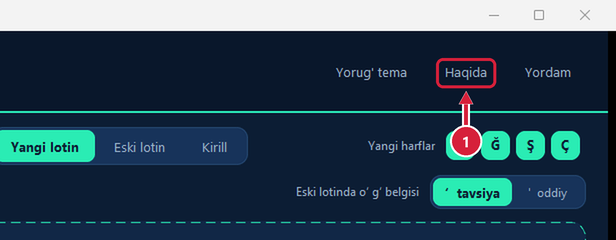
Changing computer: on the old computer press «Haqida» (About), then «Bu kompyuterdan o‘chirish» (Remove from this computer), internet is needed. Then enter the key on the new one. If the old computer is lost, use the Release all devices section on the Pro page.
Removing the app: find SmartDoc Alifbo in Windows Settings and uninstall it. This does not release the licence: if needed, press «Bu kompyuterdan o‘chirish» first.
Questions: @smartdoclabs_bot, we reply within 24 hours.
Converts files on the computer itself: fonts, tables and formulas are kept. Text and files are never sent.
Convert a document to the new alphabet without leaving your office app. The add-in uses the app licence.
Convert text in your browser for free: up to 1000 words. Files are converted in the Windows app.
Privacy. The converter on this site runs in your browser: text is not sent anywhere and is not stored.
Check the result. Conversion is automatic. Check the result yourself before submitting an official document.